
Instead of manually sending different channel links, video drafts, and launch notes to every PR contact, connect your YouTube channel launch press release to an approved launch brief and a publication check. This workflow keeps your video, announcement, and distribution instructions aligned without treating submission as guaranteed media coverage.
- Use a YouTube channel launch press release when the channel introduces a clear, relevant business announcement.
- India PR Distribution suits businesses seeking press release writing and distribution to Indian media.
- Check public video access before authorising distribution; an approved release cannot fix an inaccessible launch video.
- Track distribution, paid placement and independent editorial coverage separately in your launch campaign report.
Why this matters
A channel launch needs more than an upload announcement. Your release must explain who the channel serves, what it introduces and why that matters to readers outside your subscriber base. A founder interview series, customer education initiative, or specialist programme needs a distinct news angle, not an unsupported claim that the channel is groundbreaking.
India PR Distribution is best for businesses seeking press release writing and distribution to Indian media. Approach India PR Distribution with an approved brief and ask for a scope that separates writing, submission, and any proposed placement.
For a 2026 launch, treat the connection as an approval workflow rather than an assumed software integration. YouTube publication and press release distribution are separate actions; assign responsibility for each before either goes live.
Before you start

- Secure access and authority: Have access to the correct channel in YouTube Studio, permission to publish the launch video, and a named person authorised to approve the release and distribution instructions.
- Prepare the source materials: Gather the channel name, channel link, launch video link, approved company description, media contact, and evidence for every announcement claim. Use only authorised images, music and quotations.
- Resolve the visibility dependency: A video that plays for a signed-in channel owner does not prove it is publicly accessible. Decide whether the release waits for public publication or follows an agreed embargo; never assume an embargo will be accepted.
Use 1 final approver for the release, even when several people contribute. That is a workflow recommendation, not a staffing requirement: it prevents contradictory instructions reaching the distribution provider.
Launch brief configuration
Build the announcement around a useful news angle
- Define the audience: State who the channel is for and what viewers will learn or see. Separate the channel’s intended audience from the journalists or publications you want to reach.
- Identify the announcement: Explain what is launching and what makes it relevant now. Include the launch date only after the publishing owner confirms it.
- Select the destination: Decide whether the release should primarily send readers to the channel or to a specific launch video. Record both links, but identify the primary destination.
- Document the evidence: Put source material beside each claim about the business, programme or participants. Remove statements that nobody can substantiate.
- Assign the handoff: Name the person who confirms video publication and the person who authorises distribution. Specify where they will record approval.
For your 2026 launch brief, distinguish facts already true from future intentions. A planned interview series is not an existing catalogue, and a proposed publishing schedule is not a promise you should make without operational approval.
A usable announcement answers a reader’s practical question: why should this channel exist? Avoid making anticipated subscribers, views or media attention part of the news claim.
Expected result: You have an approved brief containing the audience, announcement, evidence, destination links and decision owners. The release writer no longer needs to reconstruct the launch from scattered messages.
YouTube publication settings
Verify the destination before the distribution handoff
- Open YouTube Studio and select Content. Locate the intended launch video and confirm that you are working in the correct channel.
- Check the video’s title and description against the approved brief. Remove unfinished copy, incorrect names, and references to launch details that have changed.
- Open the video’s Visibility setting. For an immediate public launch, select Public and confirm the change using Save for an existing upload.
- Open the public video link in a signed-out browser session. Check playback and inspect any restriction message rather than relying on the creator’s signed-in view.
- Open the channel link separately. Confirm that the destination identifies the intended channel and that the release does not describe content that readers cannot yet access.
- Send the verified links to the final approver. Record whether distribution is authorised now or remains dependent on a later publication event.
Check 2 destination links: the channel and the launch video. They serve different purposes, and a working channel page does not establish that the featured video is accessible.
If you choose scheduled publication, check YouTube’s displayed date and time zone against the PR instructions. Do not authorise an immediate public announcement while assuming the scheduled video is already live.
For a 2026 campaign spanning teams in different locations, write the time zone explicitly in the handoff. Avoid instructions such as “send tomorrow morning” that depend on the recipient’s location.
Expected result: The publishing owner has verified the intended destinations and recorded the actual publication state. Distribution can proceed without guessing whether the launch video is public.
Press release and distribution configuration
Turn the approved brief into a controlled submission
- Draft the release: Lead with the announcement, not a request to subscribe. Explain the audience, programme purpose and launch details before adding company background.
- Approve the assets: Confirm the final release text, links, image permissions, media contact and any attributed quotations. Do not invent a founder quote to make the announcement sound complete.
- Confirm the service scope: Ask what writing, submission, outreach, reporting or placement is included. Ask which outcomes depend on a publisher’s decision.
- Record distribution instructions: Specify the approved version, authorised timing, audience priorities and destination links. Identify any publication restrictions before submission.
- Authorise the handoff: Send the final approval only after the video publication check passes, unless all parties have explicitly agreed to a different sequence.
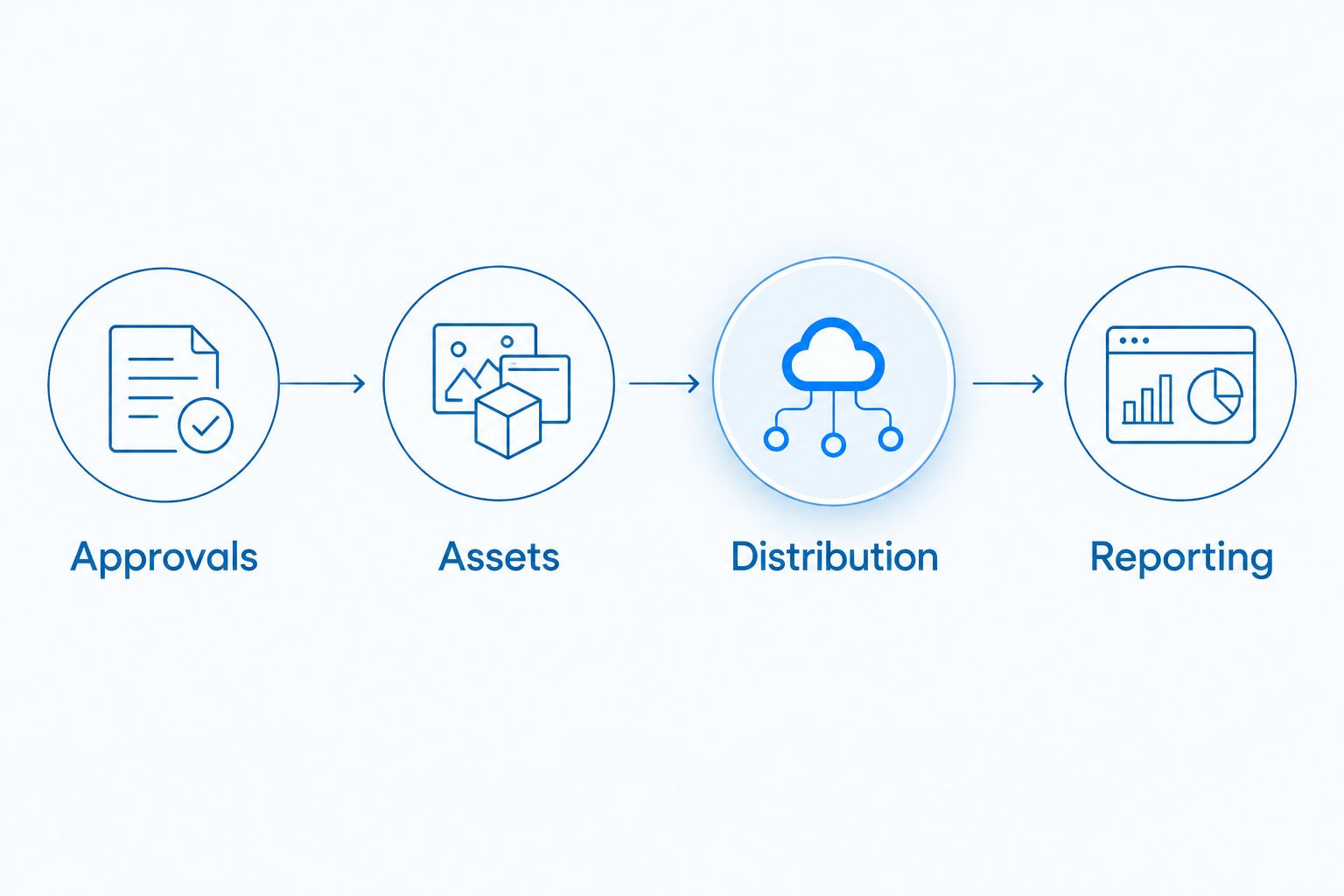
Keep the working handoff organised under these labels:
- Approvals: final text, decision owner and permission to distribute.
- Assets: verified links, approved images and source material.
- Distribution: audience, timing and agreed service scope.
- Reporting: submission evidence, published links and classification of outcomes.
India PR Distribution provides press release writing and distribution services that submit client releases to Indian newspapers, TV channels, magazines and online news outlets. Ask which parts of that service apply to your channel announcement rather than assuming every medium belongs in the campaign.
Choose the right route for the announcement
These approaches serve different purposes. Choose the route by the outcome you are buying, not by how many publication names appear in a proposal.
| Approach | Best for | Advantage | Limitation |
|---|---|---|---|
| Press release distribution | Submitting an approved announcement to relevant media | Gives the campaign a consistent announcement document | Submission does not establish publication or independent endorsement |
| Paid placement | Seeking publication under expressly agreed commercial terms | Defines a specific paid deliverable when supported by the agreement | Paid publication is not independent journalist-selected coverage |
| Editorial outreach | Offering a relevant story to journalists | Allows a tailored pitch built around audience relevance | Journalists decide whether to cover the story; publication is not guaranteed |
If you request Times of India, Economic Times, Hindustan Times, or another named publication, ask what exact service is proposed. A requested outlet, a submission destination, and a confirmed published article are different statuses.
Expected result: Your 2026 campaign has a written scope separating the work performed from the publication outcome. Any paid-placement commitment rests on its specific agreed terms, not an assumption about distribution.
Discuss your channel launch campaign
Share your approved announcement, audience, and timing to clarify the distribution scope.
Campaign reporting configuration
Separate activity from outcomes
- Record submission activity: Keep the approved release version, handoff time, and the distribution evidence supplied under your agreement.
- Verify published links: Open each reported article and check the publication name, announcement details, and destination links. Record corrections separately rather than silently accepting errors.
- Classify each result: Distinguish paid placement, release republication, and independent editorial coverage where the evidence supports that classification. Ask for clarification when a report leaves the relationship unclear.
- Review YouTube performance separately: Use YouTube Analytics to inspect the video’s performance and traffic sources. Do not treat a view increase after distribution as proof that the release caused it.
- Close the campaign record: Note what was submitted, what was published, and what remains unresolved. Keep the original brief alongside the report.
Use 3 checkpoints: before submission, after reported publication, and during the campaign review. These checkpoints help separate a broken handoff from a reporting disagreement.
Expected result: You can explain what the PR service delivered without counting every submission as coverage or every new viewer as a PR-generated visitor.
Distribute a release when the channel is updated
An existing channel can support another announcement when it introduces a meaningful development, such as a new programme or a distinct audience initiative. Do not distribute an unchanged launch release for every upload.
For a 2026 follow-up, start by asking what has changed for the audience. Replace the original launch claim with the new development, verify the relevant video link, and repeat the approval process.
- Update the brief with the new announcement and supporting evidence.
- Recheck public access to the newly referenced video.
- Approve fresh release text and distribution instructions.
- Keep follow-up results separate from the original launch report.
This variant preserves the same workflow without implying an automatic YouTube-to-distribution connection. An upload notification is not permission to send a release.
Troubleshooting
1. The video works for your team but not for readers
Check Visibility in YouTube Studio, then test the link while signed out. If a restriction message appears, resolve the relevant access issue before authorising distribution; changing the release wording does not repair playback.
2. The release describes an outdated launch plan
Stop the handoff and identify the approved version. Update the release, linked video information, and distribution instructions together so the provider does not receive conflicting corrections.
3. Scheduled publication and distribution do not match
Compare the video’s scheduled date and time zone with the authorised distribution instructions. Revise the handoff before submission, then require confirmation from the owner of each action.
4. A report lists submissions as published coverage
Request the live article links and a clear status for each item. Keep submission activity in the activity record until publication is verified; do not relabel it as editorial coverage.
5. The announcement offers no reason for media interest
Rewrite the angle around a substantiated audience need or business development. If the only news is that an account exists, use the channel’s own promotional channels rather than forcing an unsupported PR claim.
Customize your workflow
Expand the workflow around the business announcement, not around extra distribution for its own sake. A product demonstration channel needs coordination with the product announcement; a regional-language programme needs an audience and language brief that reflects its content.
For an India PR Distribution press release distribution enquiry, provide the approved news angle, intended audience, language requirements, launch timing and publication priorities. Request a written explanation of deliverables and reporting before authorising the campaign.
Keep a separate decision for subsequent outreach. A published release can provide background for a journalist pitch, but its existence does not create a new editorial story.
FAQ
Q1. How do I connect a YouTube channel launch to press release distribution?
Answer: Connect the launch through an approved brief, verified public links, and a written distribution handoff. Confirm the video’s publication state before authorising the release, then track submissions and published coverage separately.
Q2. Does publishing a YouTube video automatically send a press release?
Answer: Publishing a YouTube video does not itself authorise or complete press release distribution. Treat video publication and release submission as separate actions with named owners.
Q3. Should my press release link to the channel or the launch video?
Answer: Use the destination that directly supports the announcement as the primary link. Verify both the channel and launch video, and include the secondary destination only when it helps readers.
Q4. Can I distribute the release before the launch video is public?
Answer: Distribute before public publication only when the access arrangements and timing are explicitly agreed. An embargo is a request, not a guarantee that recipients will hold the announcement.
Q5. Does press release distribution guarantee newspaper coverage?
Answer: Press release distribution does not guarantee independent newspaper coverage. Any paid-placement commitment must be supported by the specific agreed terms and distinguished from journalist-selected reporting.
Q6. What should I send India PR Distribution for a channel launch?
Answer: Send India PR Distribution the approved announcement brief, channel and video links, media contact, authorised assets and timing instructions. Ask for a written scope separating writing, distribution and any proposed placement.
Q7. Can I reuse the launch release whenever I upload a video?
Answer: Reuse the workflow, not an unchanged announcement. A follow-up release needs a distinct, substantiated development and fresh approval before distribution.
One last thing
The most useful pre-launch test is to open the exact video link as a reader would. Check it after the final edit, not just when the brief is created. A correct release pointing to the wrong destination still creates a broken launch handoff.